# Shopdomain umbenennen

Lizenzen bei Shopware sind immer an die Domain deines Hauptshops gebunden. Wenn sich also die Domain deines Hauptshops ändert, dann musst du ebenfalls dafür Sorge tragen, dass auch die Lizenzen angepasst werden.

{% hint style="success" %}
**Tipp**: Die Lizensierung läuft über deinen Shopware-Account und nicht über uns. Wende dich bei Fragen zu Lizenzen am besten direkt an Shopware.
{% endhint %}

1. Logge dich in deinen [Shopware Account](https://account.shopware.com/) ein
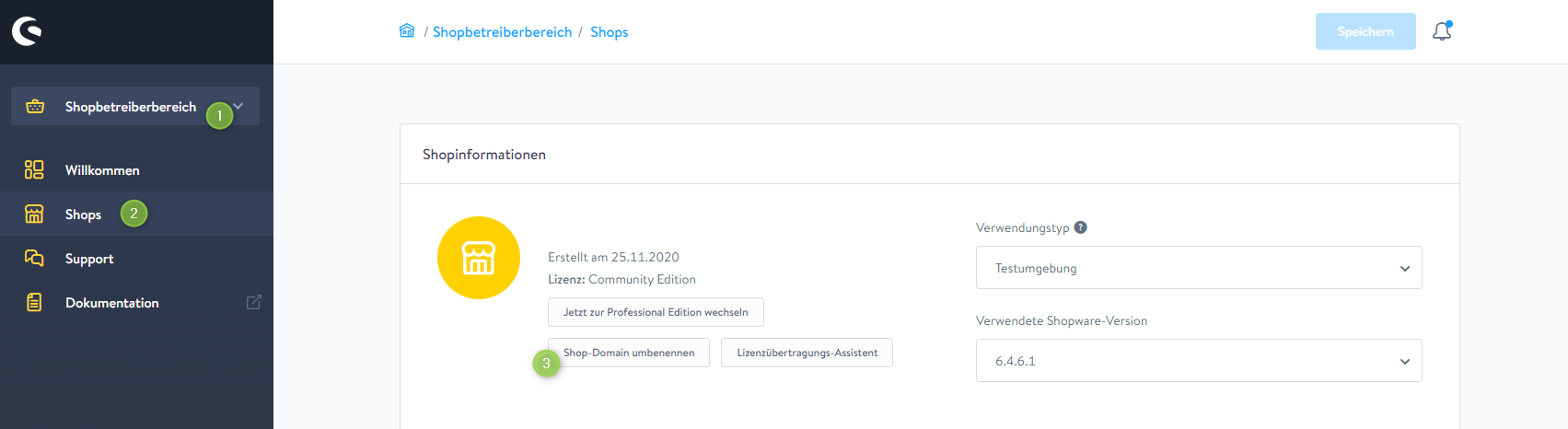
2. Gehe in den "**Shopbetreiberbereich**" (1)
3. Klicke links in der Navigation auf "**Shops**" (2)
4. Wähle nun den Shop, für den du die Lizenzen anpassen möchtest
   * Dieser wird hier noch unter der alten Domain aufgeführt sein
5. Klicke auf "**Shop-Domain umbenennen**" (3) und folge den Anweisungen

#### Screenshots

![Shopinformationen im Shopbetreiberbereich](/files/LdeWqpe3u5lE95WGkqey)


---

# Agent Instructions: Querying This Documentation

If you need additional information that is not directly available in this page, you can query the documentation dynamically by asking a question.

Perform an HTTP GET request on the current page URL with the `ask` query parameter:

```
GET https://wiki.themeware.design/wissensdatenbank/shopware/shopware-account/shopdomain-umbenennen.md?ask=<question>
```

The question should be specific, self-contained, and written in natural language.
The response will contain a direct answer to the question and relevant excerpts and sources from the documentation.

Use this mechanism when the answer is not explicitly present in the current page, you need clarification or additional context, or you want to retrieve related documentation sections.