
Achtung: Shopware ab Version 6.5 nutzt Bootstrap 5. Dieser Artikel ist dann veraltet und wird bald überarbeitet.
Die Shopware 6 Storefront basiert auf dem Bootstrap-Framework. Aufgrund unserer HC-Architecture® ist ThemeWare® ebenfalls vollständig kompatibel mit Bootstrap.
Hinweis: Dieser Artikel richtet sich an Profis und Experten. Bist du dir nicht absolut sicher, unterstützen wir dich gerne: ThemeWare® Services im Überblick
Bootstrap HTML-Eemente
In diesem Tutorial findest du die gängigsten Bootstrap HTML-Elemente, welche du in deinen Erlebniswelten nutzen kannst. Diese Elemente kannst du über den HTML-Editor von Text-Elementen in deiner Erlebniswelt platzieren.
Hinweis: Ergänzend empfehlen wir dir unsere Bootstrap-Beispiele in unseren Demoshops.
Buttons
Bootstrap bietet dir mehrere vordefinierte Button-Styles, welche du in deinen Erlebniswelten nutzen kannst und von denen jeder seinen eigenen semantischen Zweck erfüllt. Nachfolgend findest du alle verfügbaren Buttons-Styles mit Codebeispielen.

<button type="button" class="btn btn-primary">Primary</button>
<button type="button" class="btn btn-secondary">Secondary</button>
<button type="button" class="btn btn-success">Success</button>
<button type="button" class="btn btn-danger">Danger</button>
<button type="button" class="btn btn-warning">Warning</button>
<button type="button" class="btn btn-info">Info</button>
<button type="button" class="btn btn-light">Light</button>
<button type="button" class="btn btn-dark">Dark</button>

<button type="button" class="btn btn-link">Link</button>
Tabellen
Das Bootstrap-Framework enthält mehrere vordefinierte Table-Styles. Es gibt beispielsweise helle und dunkle Layouts. Nachfolgend findest du ein Beispiel für eine helle Variante.
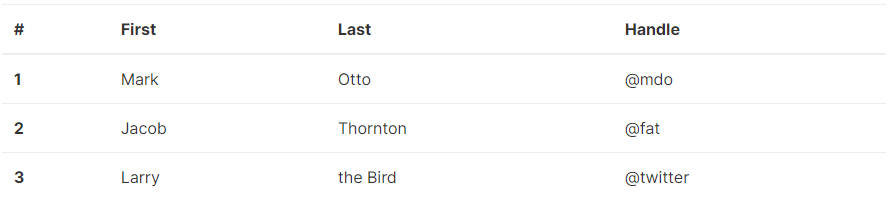
<table class="table">
    <thead>
        <tr>
            <th scope="col">#</th>
            <th scope="col">First</th>
            <th scope="col">Last</th>
            <th scope="col">Handle</th>
        </tr>
    </thead>
    <tbody>
        <tr>
            <th scope="row">1</th>
            <td>Mark</td>
            <td>Otto</td>
            <td>@mdo</td>
        </tr>
        <tr>
            <th scope="row">2</th>
            <td>Jacob</td>
            <td>Thornton</td>
            <td>@fat</td>
        </tr>
        <tr>
            <th scope="row">3</th>
            <td>Larry</td>
            <td>the Bird</td>
            <td>@twitter</td>
        </tr>
    </tbody>
</table>
Modals
Auch Modals sind bereits in Bootstrap und damit auch in Shopware bzw. ThemeWare® enthallten. Nachfolgend findest du ein Beispiel für ein Standard-Modal.
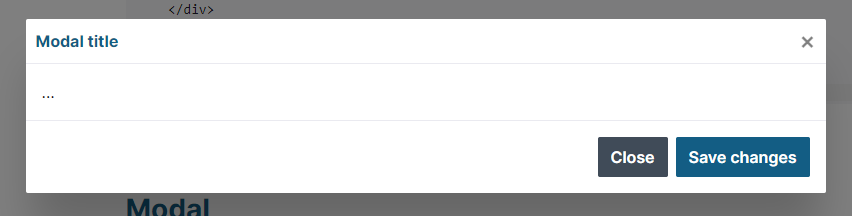
<!-- Button trigger modal -->
<button type="button" class="btn btn-primary" data-toggle="modal" data-target="#exampleModal">
Launch demo modal
</button>
<!-- Modal -->
<div class="modal fade" id="exampleModal" tabindex="-1" role="dialog" aria-labelledby="exampleModalLabel" aria-hidden="true">
<div class="modal-dialog" role="document">
<div class="modal-content">
<div class="modal-header">
<h5 class="modal-title" id="exampleModalLabel">Modal title</h5>
<button type="button" class="close" data-dismiss="modal" aria-label="Close">
<span aria-hidden="true">×</span>
</button>
</div>
<div class="modal-body">
...
</div>
<div class="modal-footer">
<button type="button" class="btn btn-secondary" data-dismiss="modal">Close</button>
<button type="button" class="btn btn-primary">Save changes</button>
</div>
</div>
</div>
</div>Accordions
Ein Accordion ist ein Element, das du für deine Erlebniswelt nutzen kannst. Das Accordion dient dazu umfangreiche Inhalte platzsparend abzubilden. Auch dies ist mit dem Bootstrap-Framework möglich.
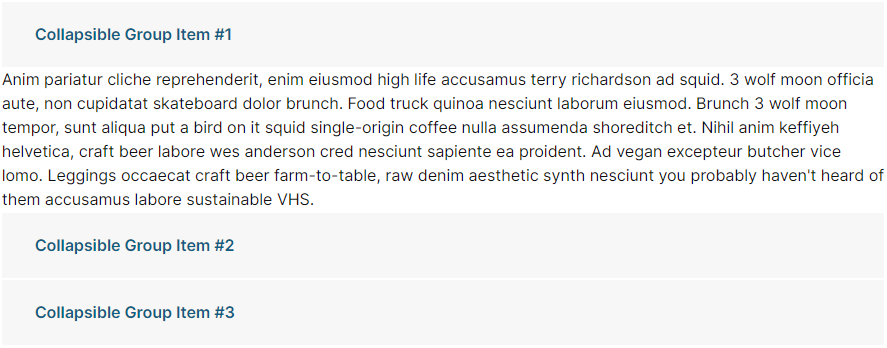
<div id="accordion">
    <div class="card">
        <div class="card-header" id="headingOne">
            <h5 class="mb-0">
                <button class="btn btn-link" data-toggle="collapse" data-target="#collapseOne" aria-expanded="true" aria-controls="collapseOne">
                    Collapsible Group Item #1
                </button>
            </h5>
        </div>

        <div id="collapseOne" class="collapse show" aria-labelledby="headingOne" data-parent="#accordion">
            <div class="card-body">
                Anim pariatur cliche reprehenderit, enim eiusmod high life accusamus terry richardson ad squid. 3 wolf moon officia aute, non cupidatat skateboard dolor brunch. Food truck quinoa nesciunt laborum eiusmod. Brunch 3 wolf moon tempor, sunt aliqua put a bird on it squid single-origin coffee nulla assumenda shoreditch et. Nihil anim keffiyeh helvetica, craft beer labore wes anderson cred nesciunt sapiente ea proident. Ad vegan excepteur butcher vice lomo. Leggings occaecat craft beer farm-to-table, raw denim aesthetic synth nesciunt you probably haven't heard of them accusamus labore sustainable VHS.
            </div>
        </div>
    </div>
    <div class="card">
        <div class="card-header" id="headingTwo">
            <h5 class="mb-0">
                <button class="btn btn-link collapsed" data-toggle="collapse" data-target="#collapseTwo" aria-expanded="false" aria-controls="collapseTwo">
                    Collapsible Group Item #2
                </button>
            </h5>
        </div>
        <div id="collapseTwo" class="collapse" aria-labelledby="headingTwo" data-parent="#accordion">
            <div class="card-body">
                Anim pariatur cliche reprehenderit, enim eiusmod high life accusamus terry richardson ad squid. 3 wolf moon officia aute, non cupidatat skateboard dolor brunch. Food truck quinoa nesciunt laborum eiusmod. Brunch 3 wolf moon tempor, sunt aliqua put a bird on it squid single-origin coffee nulla assumenda shoreditch et. Nihil anim keffiyeh helvetica, craft beer labore wes anderson cred nesciunt sapiente ea proident. Ad vegan excepteur butcher vice lomo. Leggings occaecat craft beer farm-to-table, raw denim aesthetic synth nesciunt you probably haven't heard of them accusamus labore sustainable VHS.
            </div>
        </div>
    </div>
    <div class="card">
        <div class="card-header" id="headingThree">
            <h5 class="mb-0">
                <button class="btn btn-link collapsed" data-toggle="collapse" data-target="#collapseThree" aria-expanded="false" aria-controls="collapseThree">
                    Collapsible Group Item #3
                </button>
            </h5>
        </div>
        <div id="collapseThree" class="collapse" aria-labelledby="headingThree" data-parent="#accordion">
            <div class="card-body">
                Anim pariatur cliche reprehenderit, enim eiusmod high life accusamus terry richardson ad squid. 3 wolf moon officia aute, non cupidatat skateboard dolor brunch. Food truck quinoa nesciunt laborum eiusmod. Brunch 3 wolf moon tempor, sunt aliqua put a bird on it squid single-origin coffee nulla assumenda shoreditch et. Nihil anim keffiyeh helvetica, craft beer labore wes anderson cred nesciunt sapiente ea proident. Ad vegan excepteur butcher vice lomo. Leggings occaecat craft beer farm-to-table, raw denim aesthetic synth nesciunt you probably haven't heard of them accusamus labore sustainable VHS.
            </div>
        </div>
    </div>
</div>